Your money, your rules.

Track spending, build your net worth, and let AI handle the boring stuff. The privacy-first finance app built for how Gen Z actually manages money. Your data stays yours — stored only in your own Google Cloud account, never on our servers.

Active users
$0
Free forever plan
🔒
Zero data on our servers

Everything you need to take control

Simple tools that work together to give you the full picture of your finances.

$

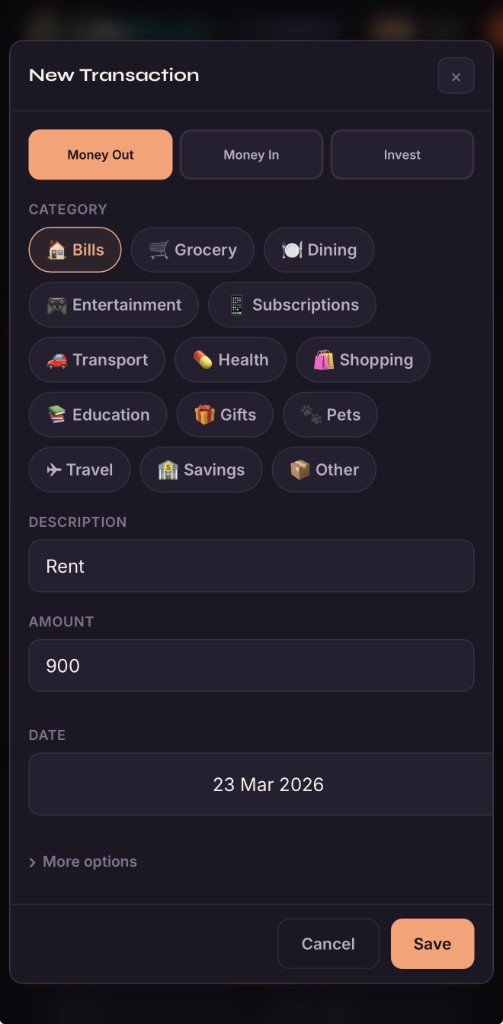
Track Income & Expenses

Log every transaction with categories, notes, and card tracking. See exactly where your money goes each month.

Smart Budgets

Set spending limits by category and track progress with visual bars that shift from green to red as you approach your cap.

AI Import PRO

Upload bank statements, CSVs, or screenshots and let AI auto-categorize every transaction for you. Zero manual entry.

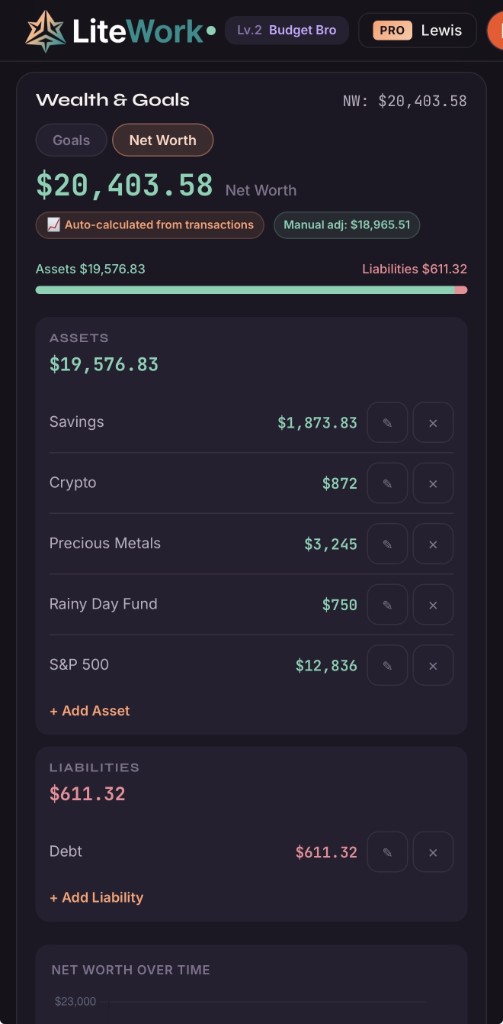
Net Worth

Track assets and liabilities side by side. Take snapshots over time to watch your net worth grow month after month.

💳

Cards & Banks

Link transactions to specific cards. See per-card spending breakdowns and track credit utilization at a glance.

📈

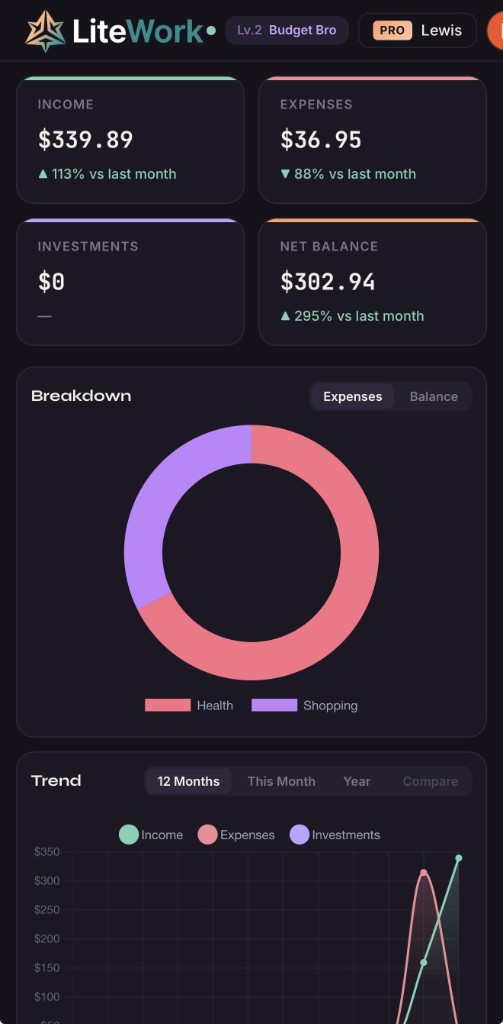
Beautiful Charts

Interactive donut and line charts give you a visual breakdown of spending by category and trends over 12 months.

🔒

Privacy First

Your financial data never touches our servers. Unlike other apps, we never ask for bank logins or sell your data. Everything is encrypted in your own Google Cloud account.

🔍

Instant Search

Search transactions by name, notes, or category across every month. Click any result to jump right to it.

🛡

Your data never touches our servers — it lives in your Google Cloud.

Unlike Mint, YNAB, and every other budgeting app — we don't store your financial data. Period. Everything lives in your own Google-secured cloud account. Encrypted, private, and entirely under your control. No data harvesting, no selling to third parties, no exceptions.

🔒 Zero Server Storage

Your transactions, budgets, and net worth data are stored directly in Google Cloud Firestore under your own account. We have no database of user finances — because we literally can't see it. Delete your account and it's gone. For real.

🔐 Encrypted End-to-End

All data is encrypted in transit (TLS) and at rest by Google Cloud. Authentication is handled entirely through Google OAuth — we never see or store your password. Your financial life stays between you and your Google account.

🚫 No Bank Linking — Ever

We never ask for bank credentials or Plaid connections. Most budgeting apps require handing your bank login to a third party — that's a hard no from us. You control what data enters the app, always.

🚀 Open Architecture

Your data is yours to export anytime — CSV, no vendor lock-in. No shady data brokers, no ad targeting from your spending habits. We make money from PRO subscriptions, not from selling your data.

Up and running in 30 seconds

No complicated setup. No bank linking. Just you and your financial data.

01

Sign in with Google

One-tap sign in with Google. Your data is stored in your own cloud account — never on our servers — and synced across all your devices automatically.

02

Add your transactions

Log income, expenses, and investments manually or use AI Import to upload bank statements and let us handle it.

03

See the full picture

Charts, budgets, net worth, and year-end summaries give you a crystal-clear view of where your money stands.

Start free. Upgrade when you're ready.

No credit card required. No trial limits. The free plan is yours forever.

Free
$0 /forever
Seriously free. No trial. No catch.
  • Income & expense tracking
  • Charts & visual breakdowns
  • Year-at-a-glance table
  • Unlimited cards/banks
  • Per-category budgets
  • Net worth tracking
  • Financial goals
  • Custom categories
  • CSV export
  • Global search
  • 1 free AI scan per month
  • No AI Roasts or Health Reports
  • Ads shown
Get Started Free
Pro
$3.99 /mo
Or $29.99/year (save 37%)
  • Everything in Free, plus:
  • 50 AI operations/month (imports, roasts, reports)
  • Financial Health Report (AI-powered)
  • Financial Roast (AI spending review)
  • Ad-free experience
  • Priority support
PRO vs buying credits
50 AI ops via credits = ~$20/mo at $0.50 each
PRO gives you the same for $3.99/mo — save 80%
Start Free, Upgrade Anytime
Prefer pay-as-you-go?

Buy credits for one-off AI features without a subscription. AI Import costs 2 credits, Roast costs 1 credit, Health Report costs 3 credits.

10 credits — $4.99 25 credits — $9.99 (save 20%)

Got questions? We've got answers.

Is LiteWork Finance really free?

Yes. The free plan includes income and expense tracking, charts, budgets, net worth tracking, financial goals, year-at-a-glance, search, CSV export, and 1 free AI scan per month. No trial, no credit card, no expiration. PRO unlocks 50 AI operations per month (imports, roasts, and health reports), an ad-free experience, and priority support.

How does the AI import feature work?

Upload a CSV, PDF bank statement, or even a screenshot of your transactions. Our AI reads the data, auto-categorizes each transaction (groceries, dining, bills, etc.), and lets you review everything before importing. It saves hours of manual entry.

Is my financial data secure?

Your financial data never touches our servers. It's stored directly in Google Cloud Firestore under your own account with strict per-user security rules — only you can access it. All data is encrypted in transit (TLS) and at rest by Google Cloud infrastructure. We use Google OAuth for authentication, so we never see or store your password. We don't use Plaid, we don't link to your bank, and we never share or sell your information. If you delete your account, your data is gone — we have nothing to retain.

Does it work on mobile?

LiteWork Finance is a responsive web app that works great on any device. Open it in your phone's browser and add it to your home screen for an app-like experience. No download required.

What payment methods do you accept?

PRO subscriptions are processed through LemonSqueezy, which supports credit cards, debit cards, Apple Pay, Google Pay, and PayPal in most regions.

Can I cancel anytime?

Yes, cancel anytime from your account. You'll keep PRO access until the end of your billing period. No cancellation fees, no questions asked.

How is this different from other budget apps?

Most budget apps are bloated, expensive, or require linking your bank — handing your credentials to a third party. LiteWork Finance is purpose-built for Gen Z: fast, minimal, and privacy-first. We never store your financial data on our servers or ask for bank access. Your data lives in your own Google Cloud account. Plus, our AI import lets you skip the tedious manual entry that makes people quit budgeting. Free to start, no trial, no catch. And at $3.99/month for PRO (or buy credits as you go), it's a fraction of what competitors charge.

What are credits?

Credits let you use AI features without a subscription. AI Import costs 2 credits, Financial Roast costs 1 credit, and Health Report costs 3 credits. Buy 10 credits for $4.99 or 25 for $9.99. PRO subscribers who use all 50 monthly AI operations can also buy credits for additional usage.

What is the fair usage limit for PRO?

PRO gives you 50 AI operations per month — that's imports, roasts, and health reports combined. Most users never come close to this. If you do need more, you can buy credit top-ups to keep going. The counter resets on the 1st of each month.

Do you have a referral program?

Yes! Share your unique referral link and both you and your friend get 3 free credits when they sign up. Find your link in your Profile (top-right of the app).
Money tips that actually make sense

No-fluff guides on budgeting, saving, and building wealth in your 20s.